
2020 January–March
Internal platform changes that are not visible to capsule developers will be communicated via internal status updates.
20C Capsule SDK Release Notes
Updated: March 25, 2020
Update to Capsule Lock Opt Out and Conversation Drivers
If your capsule opts out of capsule lock by setting the new result-view-capsule-lock runtime flag to false, conversation drivers with result moments in your capsule might not behave as expected.
New Macros for Dialog and Layout
You can now define a layout or a dialog with a macro. Use macro to define repeatable portions of your layouts or dialogs, such as a card or a cell for a specific structure or entire portions of a Bixby View. You define the exact parameters within a macro using a macro-def. For more information, see Reusing Content with Macros.
result-view {
  match: MyConcept(this)
  render {
    layout {
      macro (my-macro) {
        param (myParam) {
          expression (this)
        }
      }
    }
  }
}
Text Types Deprecated within 'Pattern For' Training
Because the Bixby platform is not designed for it, we're deprecating the ability to use Text type values with Pattern For specialized training examples, which allow you to refer to specific structured concepts using NL.
For example, if you have a note-taking capsule that has a Pattern For training entry [g:Note:pattern] Make a note (get groceries)[v:NoteText], where NoteText is role assigned to Text, you will now get a deprecation warning.
For more information, see the Pattern For section in the Training for NL Developers' Guide.
Deprecation Stages
Learn more about the deprecation stages.
- Stage 1: R20E
- Stage 2: R20H
- End of Life: None
New NL Categories Added for ko-KR Locale
The following NL categories were added this release:
AstrologyCoffeeOrderCurrencyConversionMovieTickets
20B Capsule SDK Release Notes
Updated: March 10, 2020
Issue with Runtime Version 4 and Location
If your capsule uses runtime version 4 and imports the viv.geo library capsule, your ability to get the user's current location using viv.geo.SearchRegion is currently limited.
As a workaround, you can revert to using runtime version 3, or you can set the use-most-specific-instantiation-strategy runtime flag to false:
use-most-specific-instantiation-strategy (false)YouTube and Vimeo Video Support
Within Bixby Views, you can now embed YouTube and Vimeo videos using the new youtube and vimeo sub-keys, respectively:
Examples
section {
  content {
    video {
      vimeo {
        video-id ("376938961")
      }
    }
  }
}
section {
content {
video {
youtube {
video-id ("7zP30QYMUjQ")
}
}
}
}New Options for Thumbnail Shape and Size
You now have the option to determine the shape (image-shape) and size (image-size) of thumbnail images within Bixby Views.
Circle thumbnail:
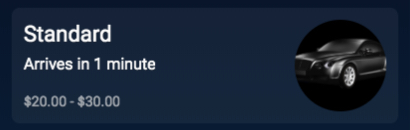
Small thumbnail:

New Runtime Flag and EL Function Related to Duplicate Node Elements
By default, Bixby ensures that multi-value properties have unique values by merging duplicate values. The new no-auto-property-value-merging
runtime flag prevents this.
Additionally, you can now use the Expression Language (EL) function dedupe to merge equivalent elements of a specified node.
Example
action (ReduceStrings) {
 type (Constructor)
 collect {
   input (strings) {
     type (String)
     min (Optional)
     max (Many)
   }
 }
 output (String) {
   evaluate {
     $expr(dedupe(strings))
   }
 }
}
New Runtime Flag for Instantiation Strategies
We've added a new runtime flag, use-most-specific-instantiation-strategy, that changes the default match mode of instantiation strategies to MostSpecific. When enabled, all instantiation-strategy files use the most specific match pattern.
Example
capsule {
  runtime-version (1) {
    overrides {
      use-most-specific-instantiation-strategy (true)
    }
  }
}
New Runtime Version 4
We've added a new runtime version that covers a number of runtime flags:
concepts-inherit-super-type-featuresno-auto-property-value-mergingno-filtering-with-validationmodern-default-view-behaviormodern-prompt-rejectionsupport-halt-effect-in-computed-inputsuse-authorization-header-for-remote-endpoint-oauthuse-input-views-for-selection-list-detailuse-most-specific-instantiation-strategy
20A Capsule SDK Release Notes
Updated: March 18, 2020
New Thumbnail Area Component in Bixby Views
The size key in cards and images is now deprecated. Use the new aspect-ratio key to specify how an image or a card fits in a Bixby View.
Old:
image-card {
  size (L)
  ...
}
New:
image-card {
  aspect-ratio (4:3)
  ...
}
For more information, see Cards in Bixby Views.
Deprecation Stages
Learn more about the deprecation stages.
- Stage 1: R19O
- Stage 2: R19O
- End of Life: R19U
New Runtime Version 3
We've added a new runtime version that covers a number of runtime flags:
concepts-inherit-super-type-featuresno-filtering-with-validationmodern-default-view-behaviormodern-prompt-rejectionsupport-halt-effect-in-computed-inputsuse-authorization-header-for-remote-endpoint-oauthuse-input-views-for-selection-list-detail
For more information, read about runtime version 3.
Batch 7 Categories Released
The following NL categories were added this release:
AudioBookMovieTicketsLotteryTriviaJobSearchSportsScore
'$user.nickName' Deprecated
We've deprecated the $user.nickName Expression Language function because it never returned a value.
Deprecation Stages
Learn more about the deprecation stages.
- Stage 1: R20A
- Stage 2: R20D
- End of Life: R20O
Updates to User Location Capsule Permission
If you previously used the user-profile-access permission for accessing the user's location, you now should now use the device-location-access permission. The user-profile-access permission will soon be deprecated.
Required Justification for Capsule Permissions
If you are requesting permissions in your capsule-info.bxb, you must now provide a localized justification using the requested-permissions key, which is then presented to the user:
capsule-info {
  ...
  requested-permissions {
    ...
    permission (user-profile-access) {
      justification (Your location will be used to find restaurants nearby)
    }
  }
}
Deprecation Stages
Learn more about the deprecation stages.
- Stage 1: R20A
- Stage 2: R20G
- End of Life: R20O
19X Capsule SDK Release Notes
Updated: January 22, 2020
Batch 6 Categories Released
The following NL categories were added this release:
WeatherMeditationRealEstateSleepSoundsFlowersGifts
Optional OAuth for Endpoints
We now allow endpoints to optionally require user oAuth using the optional sub-key within authorization.user.
action-endpoint (...) {
  ...
  authorization: user: optional
}
If your endpoint includes optional user oAuth, Bixby won't automatically prompt the user to login, which is the case when without the optional key.
If you want to prompt the user with the optional user oAuth, you must do so through your endpoint implementation. Here is an example function for including optional user oAuth within your endpoint:
if ($vivContext.accessToken) { // if this is present, the user is logged in
// access protected resource
http.oauthGetUrl();
} else {
var doLogin = // some condition if the user should login
if (doLogin) {
var err = new Error('Login required');
err.$type = 'authorization-error';
err.$message = 'You must have log in to authorize access';
throw err; // throwing a type 'authorization-error' error will trigger the login prompt
}
// obviously don't use oauthGetUrl here, the user is not logged in
http.getUrl();
}